High-resolution RGB
Turn high-resolution aerial RGB imagery into orthophotos, point clouds, elevation models and textured 3D deliverables.
RGB imagery → orthophoto → 3D
Data & processing workflowExplore sample workflow ↗HELLOGEO SUITE / SPATIAL INTELLIGENCE
HelloGeo Suite brings high-resolution RGB, multispectral, thermal, LiDAR and satellite data into one geospatial workspace. Explore oblique and video-frame mapping, review hyperspectral integration, and deliver maps, models and measured results.
MULTISENSOR PROCESSING
Choose the source that answers your project question. HelloGeo Suite connects image reconstruction, band-aware analysis, point-cloud processing and GIS delivery, with data and engine requirements made explicit.
Turn high-resolution aerial RGB imagery into orthophotos, point clouds, elevation models and textured 3D deliverables.
RGB imagery → orthophoto → 3D
Data & processing workflowExplore sample workflow ↗Use video-input controls and extracted RGB frame datasets for mapping workflows, with limits and resolution set through the connected engine.
Selected frames → image task → map
Engine-dependent video inputExplore sample workflow ↗Map calibrated spectral bands, align imagery and derive vegetation, water, soil and red-edge products from the bands your sensor actually supplies.
Aligned bands → indices → field review
Data & processing workflowExplore sample workflow ↗Review georeferenced hyperspectral exports, wavelengths and calibration before selecting compatible bands and downstream spectral analysis.
Wavelength mapping → qualified handoff
Integration assessmentExplore sample workflow ↗Import LAS/LAZ, classify ground, generate DSM/DTM surfaces and inspect scalable EPT point clouds.
LAS / LAZ → classification → terrain
Data & processing workflowExplore sample workflow ↗Plan nadir and oblique RGB capture for facade coverage and 3D reconstruction, with suitable overlap, camera calibration and processing settings.
Multi-angle images → textured 3D
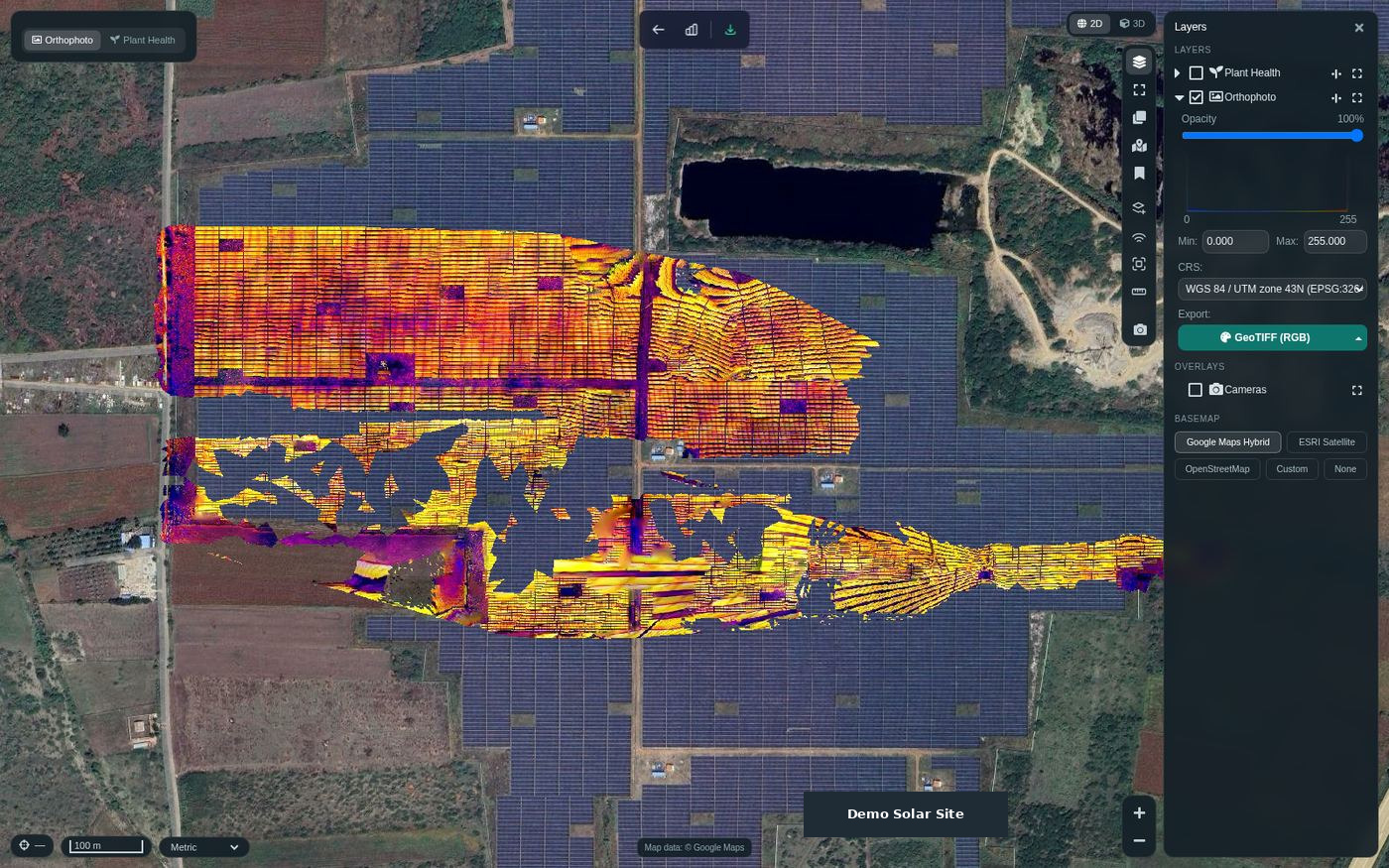
Data & processing workflowExplore sample workflow ↗Review thermal rasters and temperature products alongside RGB and multispectral context when suitable radiometric data and calibration are supplied.
Calibrated imagery → thermal review
Data & processing workflowExplore sample workflow ↗Upload georeferenced satellite rasters or Sentinel-2 SAFE/JP2 bands, confirm band mapping and create analysis-ready map products.
SAFE / JP2 / GeoTIFF → regional layers
Data & processing workflowExplore sample workflow ↗High-frame-rate capture is assessed through usable video frames and the configured engine; no fixed FPS throughput is promised. Full hyperspectral-cube processing requires dataset and integration qualification.
CAPTURE → PROCESS → REVIEW → DELIVER
Capture and site systems establish the observations. Suite brings suitable imagery, point clouds and GIS layers into a processing project, with the source and review context kept visible.
Plan aerial collection in Nexus and capture with a qualified drone or Drone Station. Supply satellite scenes, survey control, point clouds or project layers.
Capture route · Payload · Acquisition dateSet the area of interest, coordinate reference and height datum. Review coverage, image overlap, spectral bands and the available reference data.
AOI · Band mapping · Data readinessChoose aerial reconstruction, LiDAR terrain, spectral indices, land cover, change or measurement workflows for the supplied datasets.
Maps · Models · Analytic layersCheck the result against project references. Package suitable maps, GIS exports, measurements and a quality review for the intended decision.
Evidence · Review record · DeliverablesOne ecosystem, clear roles. Nexus and VECTOR support qualified flight workflows; Drone Station supports repeat capture; Point and MetaSync organise survey references. ArtPole and AI Vision contribute site observations. HelloGeo Suite processes compatible spatial datasets; connection and transfer depend on the selected interfaces and deployment.
Connect sources in Experience ↗SENSOR & DATA ECOSYSTEM
Explore named OEM and satellite data families with a practical handoff checklist. Compatibility follows the exported files, calibration, metadata and configured processor.
| Data family | OEM / data source & required handoff | Compatibility scope |
|---|---|---|
| RGB & oblique | DJI · AutelSupported image datasets; JPEG or prepared image exports with camera and capture metadata. DNG decoding depends on the processing engine. | Image workflowInput guide ↗ |
| Multispectral | MicaSense RedEdge-P / Altum-PT · Parrot Sequoia / Sequoia+ · SenteraCalibrated TIFF / GeoTIFF, aligned bands, irradiance or panel context. Indices require the actual measured bands; no SWIR is inferred. | Prepared-data compatibilityInput guide ↗ |
| Thermal / IR | MicaSense Altum-PT · qualified thermal payloadsRadiometric thermal input, sensor response, emissivity and reflected-temperature context. A coloured preview does not establish a temperature measurement. | Data & engine qualificationInput guide ↗ |
| Hyperspectral | Specim · Headwall · ResononManufacturer-prepared ENVI cubes or mapped georeferenced bands, wavelength and calibration metadata. Review conversion and processing adapters for each dataset. | Integration assessmentInput guide ↗ |
| LiDAR | RIEGL · Livox · HesaiGeoreferenced LAS / LAZ handoff. Raw packets and PCD require suitable trajectory correction, conversion and calibration before import. | Prepared point-cloud compatibilityInput guide ↗ |
| Sentinel-2 | Copernicus / ESA Sentinel-2SAFE ZIP, named JP2 bands or georeferenced GeoTIFF. Retain band mapping, acquisition date and supplied SCL masks. | Documented ingestion routeInput guide ↗ |
| Landsat | USGS / NASA LandsatPrepared GeoTIFF bands with the correct scale/offset, masks, georeferencing and acquisition metadata. | Prepared-data compatibilityInput guide ↗ |
| Commercial satellites | Planet · Airbus · MaxarLicensed, prepared georeferenced imagery and spectral metadata. Product level, available bands and licence determine the analysis; imagery ordering remains separate. | Dataset qualificationInput guide ↗ |
Named brands identify data sources to assess, not certified integrations or endorsements. Confirm the exact sensor variant, processing engine and a representative dataset before deployment. Satellite imagery licences and acquisition services remain separate.
ANALYSIS / MEASUREMENT / DELIVERY
Move from processed layers to change detection, AI-assisted classification, measured volumes and shareable GIS deliverables. Each workflow keeps its source requirements and review context visible.
42band-aware formula entries
35 indices · 5 band products · 2 temperature conversions
6volume base-surface methods
cut · fill · net · total
2D + 3Dsaved project measurements
distance · area · height · volume
Explore 35 spectral indices, five individual-band products and two temperature conversions; eligible outputs follow the input bands.
42 is the catalogue size, not the output count for every sensor. True NDVI needs NIR; MNDWI/NDBI/NDMI need SWIR1; NBR needs SWIR2.
Compare scenes across dates using visual change, elevation or index differences, land-cover transitions and flood/recession mapping.
Comparable georeferencing, datum, dates and appropriate bands are required. Some transition/formula comparisons are API/model capabilities rather than confirmed prominent UI options.
Screen RGB orthophotos for vegetation, water and bare-ground patterns, then review and export the classified layers.
This is rule-based visible-spectrum classification, not a trained AI model or a replacement for multispectral NDVI.
Produce vegetation, water, built-up, bare-ground and wetland layers with polygons and statistics; use supplied Sentinel-2 SCL for cloud/shadow exclusion.
Wetland is a proximity-based indicator; arid/bare ground can be confused with built-up areas. No general validated accuracy percentage.
Combine geometric point-cloud rules with optional imagery-model assistance for road, building and forest classification.
Requires a configured compatible ONNX model and usable RGB point data. This is not a verified universal AI denoising or noise-reduction service.
Tune point-cloud filtering, sampling and geometric checks through the processing engine's supported options.
pc-filter, pc-sample and pc-skip-geometric mappings are real UI code. Do not imply all filters are AI-driven; active support depends on the chosen engine.
Measure cut, fill, net and total earthworks volume with six selectable base-surface methods, and save the measurement to your project.
Base methods: triangulated, fitted plane, average, custom elevation, highest and lowest. Quality depends on source DEM, units, datum and polygon/base selection.
Save and revisit distance, area, height and volume measurements with project geometry and source context.
Correct projection and source geometry are required.
Extract and regularize building footprints from classified point clouds for reviewed urban mapping deliverables.
Semantic building classification is required. LOD2 solids and Unity-facing glTF export are explicitly future work in this module.
Explore slope, hillshade, benches, ramps and faces, with reviewed earthworks measurements.
Automatic stockpile volumes are explicitly not validated on a real mine in source comments; present them as provisional if exposed.
Draw or import named project boundaries using GeoJSON, zipped Shapefile, GeoPackage or KML.
Inputs must carry valid geometry and a suitable coordinate reference.
Work with project CRS and vertical-datum handling, including EGM96 and optional EGM2008 geoid grids.
EGM2008 needs its configured grid; conversions do not establish survey accuracy.
Share permitted projects and deliver rasters, classification vectors, CSV statistics, measurements and 3D/point-cloud assets.
Source-level integration reviewed; no live export or permissions exercise in this audit.
Choose source-image retention, cloud archiving and restoration to manage local storage while preserving the selected project workflow.
Permanent image deletion/compaction is a separate destructive retention choice and prevents reprocessing from those images. Do not market data deletion as AI reduction.
Use tiled raster/point-cloud processing, dedicated worker queues and supported split/merge settings for larger projects.
Deployment sizing, configured limits and real-data qualification remain necessary; do not claim unlimited scale.
Available formulas follow the supplied bands. AI-assisted classification requires its optional model; filtering and sampling are separate engine controls. Features were checked against the Suite application source on 18 October 2026.
APPLICATIONS / CONNECTED TO SUITE
Each application connects its source data with the relevant Suite processing and a defined output. Open the environment to assemble the workflow in Experience.
Marine scope covers coastal and surface-water mapping; bathymetry and sonar processing require separate qualification. Aviation outputs support infrastructure review, not flight clearance or certified obstacle assessment. Agronomic interpretation and commercial quantities need independent validation.
GLOBAL PROJECTS / LOCAL REQUIREMENTS
We welcome Suite project enquiries across the United States, Europe, India, the UAE including Dubai, South Korea, Australia and Singapore. Start with the application and dataset, then define the delivery and deployment requirements.
Connect RGB and multispectral surveys with Landsat or Sentinel-2 context. Specify project CRS, vertical reference, units and review criteria for maps and volumes.
Discuss a United States project ↗Plan Sentinel-2 land-cover, water and change workflows alongside local aerial surveys. Include data residency, project coordinates and reference-layer requirements.
Discuss a Europe project ↗Combine field boundaries, aerial imagery and terrain for crop review, infrastructure and city datasets. Share control references and delivery formats.
Discuss a India project ↗Review oblique imagery, surface change and cut/fill workflows. Include capture conditions, base surfaces and project deployment requirements.
Discuss a UAE · Dubai project ↗Connect repeat aerial mapping, thermal review and terrain evidence. Provide site context, language needs, dataset formats and deployment preferences.
Discuss a South Korea project ↗Prepare large-area terrain and stockpile measurement workflows, plus surface-water and coastal change review. Define independent validation requirements.
Discuss a Australia project ↗Bring multi-angle imagery, point clouds and project layers together for city and infrastructure review. Specify coordinate, privacy and hosting requirements.
Discuss a Singapore project ↗Regional delivery, hosting, local requirements and support arrangements are agreed for each project. This directory describes enquiry markets, not additional office locations.
PRACTICAL DATA GUIDES
Understand sensor files, satellite bands, LiDAR measurements and image capture before building your project.
Plan RGB, multispectral, hyperspectral, thermal and LiDAR data handoffs for HelloGeo Suite, with MicaSense, Parrot and other OEM qualification guidance.
Read the guide ↗Satellite processing guidePrepare Sentinel-2 SAFE and JP2 or licensed satellite GeoTIFF imagery for band-aware indices, land-cover, water and change workflows in HelloGeo Suite.
Read the guide ↗Point-cloud and measurement guidePlan LAS/LAZ terrain processing, point-cloud filtering, optional AI classification and reviewed cut/fill measurements with HelloGeo Suite.
Read the guide ↗Photogrammetry workflow guidePlan high-resolution RGB imagery, oblique capture and extracted video-frame photogrammetry with quality checks and processing-node requirements.
Read the guide ↗BEFORE YOU START
Suite includes RGB, oblique, multispectral, thermal, LiDAR and satellite workflows. Sensor files must meet format, calibration, georeferencing and processing-engine requirements. Prepared hyperspectral datasets require an integration assessment.
These are named multispectral data families in the compatibility guide. Supply supported calibrated imagery, band alignment and capture metadata, and qualify the exact sensor and processor with sample data. Indices depend on the measured bands.
Sentinel-2 SAFE ZIP and named JP2 bands have a documented ingestion route. Prepared Landsat GeoTIFF bands can be assessed through the georeferenced-raster workflow with scale factors, masks and band mapping retained.
Saved measurements include cut, fill, net and total volumes with six base-surface methods. Optional AI imagery-assisted point-cloud classification supports configured workflows. Point filtering and sampling are separate engine controls; all measurements require suitable source and reference data.
QUALITY / ENVIRONMENT / REPORTS
Connect the environment, selected sources, processing steps and review criteria. Keep a proposed solution study distinct from a quality report based on real project results.
THE ORIGINAL WORKSPACE
Explore the retained HelloGeo Suite project and planning interface. The product views show captured interface states; the connected Experience demonstrates the proposed data journey.